

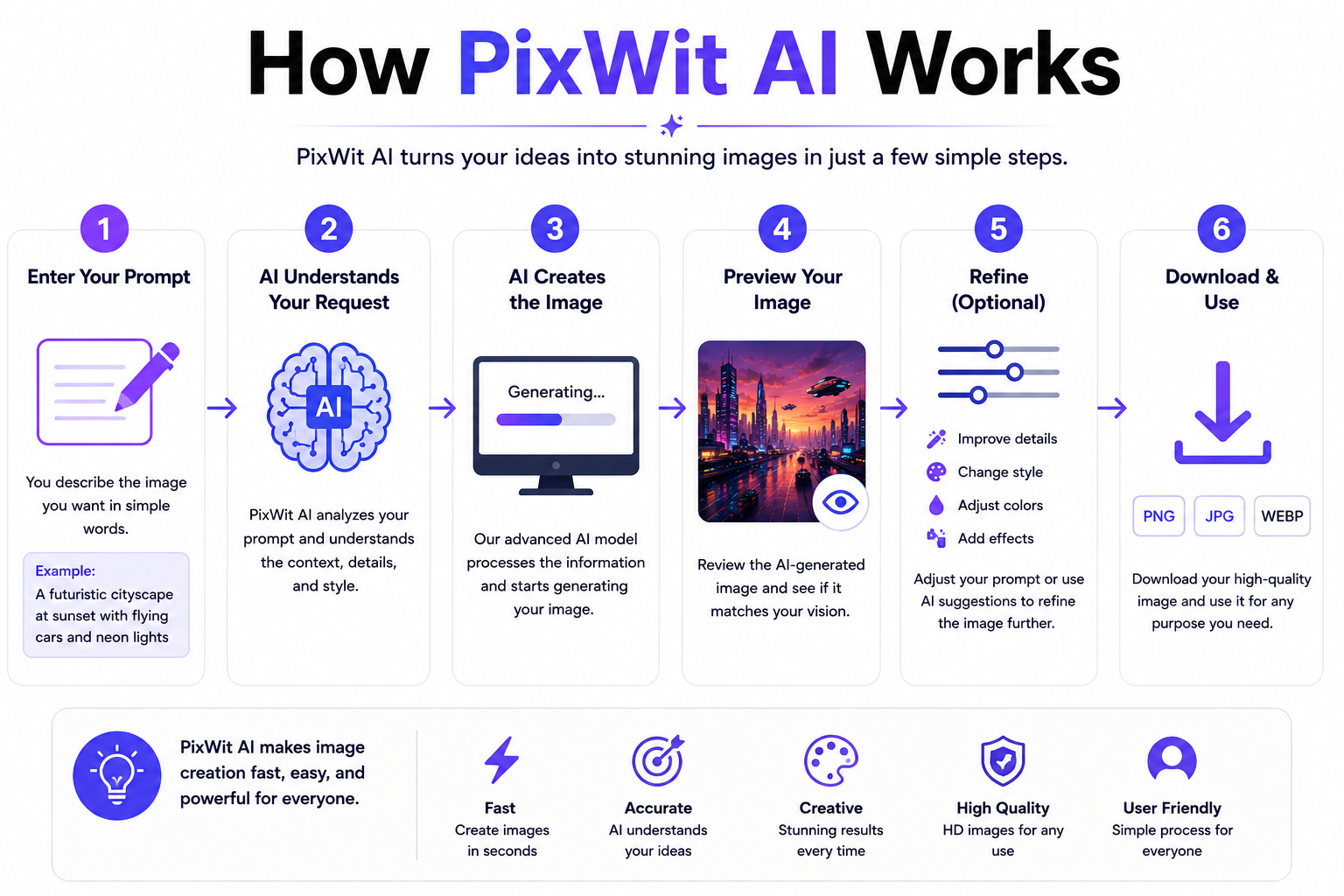
How PixWit AI Works can be explained simply: PixWit AI uses artificial intelligence to convert text prompts, images, scripts, and product information into professional videos. The platform analyzes user input, understands the creative requirement, generates AI-powered scenes, adds animations and effects, and provides editing options to create high-quality videos quickly without advanced video editing skills.
Key Takeaways
- PixWit AI is an AI-powered video and image creation platform.
- It helps users create videos from text, images, scripts, and product details.
- AI automates scene creation, animation, editing, and visual enhancement.
- It is useful for content creators, marketers, businesses, and agencies.
- PixWit AI reduces the time required for traditional video production.
- Detailed prompts help generate better AI video results.
What Is PixWit AI?
PixWit AI is an artificial intelligence-based video creation platform that allows users to generate engaging videos using simple inputs such as text, images, scripts, and product information.
Traditional video creation requires professional editing software, technical knowledge, expensive equipment, and a significant amount of time. PixWit AI simplifies this process by using AI automation to create videos faster and more efficiently.
The platform is designed for people who want to create professional visual content for:
- Social media marketing
- YouTube channels
- Product promotions
- Business advertisements
- Educational content
- Brand storytelling
With AI-powered features, PixWit AI helps users transform ideas into visually appealing videos without spending hours on manual editing.
How PixWit AI Works
Provide Your Content Idea
The first step in understanding How PixWit AI Works is knowing how users provide input.
PixWit AI allows users to start video creation through:
- Text prompts
- Images
- Scripts
- Product URLs
- Creative descriptions
For example, instead of manually creating a product advertisement, users can provide a simple instruction:
“Create a modern promotional video for a smart watch with cinematic visuals and professional effects.”
The AI uses this information as the foundation for creating the video.
AI Analyzes User Input
After receiving the instructions, PixWit AI analyzes the provided information using artificial intelligence technology.
The AI understands:
- Main topic
- Video purpose
- Visual style
- Scene requirements
- Objects and characters
- Motion effects
- Storytelling structure
- How PixWit AI Works
This process helps the system create content that matches the user’s expectations.
AI Creates Video Scenes
Once the AI understands the requirement, it generates different video elements automatically.
The generation process may include:
- Scene creation
- Background generation
- Object placement
- Animation effects
- Camera movements
- Visual transitions
Instead of manually designing every frame, users can allow AI to create the initial video draft.
Customize the Generated Video
After AI generates the video, users can improve the content according to their needs.
Customization options may include:
- Adding text
- Changing visuals
- Adding music
- Including voiceovers
- Adjusting scenes
- Applying branding elements
- Editing video duration
This makes the final output more suitable for different platforms and audiences.
Export and Publish
The final video can be exported and shared across multiple platforms.
Users can publish AI-generated videos on:
- YouTube
- TikTok
- Websites
- Marketing campaigns
This complete workflow makes AI video creation faster and easier.
PixWit AI Features
1. Text-to-Video Generation
PixWit AI can convert written descriptions into videos. Users only need to describe their idea, and AI generates visual content based on the prompt.
2. Image-to-Video Creation
The platform can transform static images into dynamic videos by adding movement, animation, and visual effects.
3. Script-to-Video Generation
Users can provide scripts, and PixWit AI can help convert written content into engaging video presentations.
4. AI Video Editing
PixWit AI helps users improve generated videos through editing features like:
- Text overlays
- Music integration
- How PixWit AI Works
- Voice options
- Scene adjustments
- Visual improvements
5. Marketing Video Creation
Businesses can create promotional videos, advertisements, and product demonstrations using AI automation.
Benefits of PixWit AI
Saves Time
AI automation reduces the need for manual editing and speeds up the video production process.
Easy for Beginners
Users without professional editing experience can create videos using simple instructions.
Cost Efficient
AI tools can reduce dependency on expensive production resources.
Increases Content Production
Creators can produce more videos for blogs, social media, and marketing campaigns.
PixWit AI Use Cases
Content Creators
YouTubers and social media creators can generate videos quickly for their audience.
Digital Marketers
Marketing professionals can create advertisements, promotional videos, and campaign content.
E-commerce Businesses
Online stores can create product videos to improve customer engagement.
Educational Platforms
Teachers and trainers can create explainer videos and learning materials.
Agencies
Creative agencies can use AI to speed up client projects.
Inshort
PixWit AI makes video creation easier by combining artificial intelligence with automated content generation. The platform allows users to transform ideas, images, scripts, and product information into professional videos without requiring advanced editing skills.
For creators, marketers, and businesses looking for a faster way to produce visual content, PixWit AI can be a valuable AI-powered solution. By using detailed prompts and proper customization, users can create engaging videos suitable for modern digital platforms.
Frequently Asked Questions (FAQ)
1. How PixWit AI Works?
PixWit AI works by analyzing text prompts, images, scripts, or product information and converting them into AI-generated videos through automated scene creation, animation, and editing processes.
2. Can PixWit AI create videos from text?
Yes, PixWit AI can generate videos from text prompts by understanding the description and creating AI-powered visual content.
3. Is PixWit AI beginner-friendly?
Yes, PixWit AI is designed for beginners and professionals because it reduces the complexity of traditional video editing.
4. Can PixWit AI convert images into videos?
Yes, PixWit AI can transform images into animated videos with AI-generated effects and motion.
5. Who can use PixWit AI?
Content creators, marketers, businesses, educators, and agencies can use PixWit AI for different video creation needs.
Also read : Writesonic Content Generator Features Benefits & Review